Run it your way.
Desktop Gantt chart software that installs on your own PC, keeps your projects there and works offline. Start on the Free plan with no key.
GanttPulse for Windows
The full app on your machine.
- File
-
GanttPulse-1.8.1-Setup.exe· 48.1 MB - Released
- November 22, 2026
- SHA-256
-
cb9355dae52f74600b27fe3df2baa6381e139abdfd3294a22de1f922ebee72be
- The full Gantt, the AI assistant, dependencies and exports, in one install
- Installs for your Windows account only, so it needs no administrator rights
- Opens in its own window, with its icon in the system tray
- Free plan with no key: 1 project, 15 tasks, 3 people. The full app with a beta key
- Your projects are files on your PC, and uninstalling keeps them
- Claude Code works on the Free plan, and Claude's projects have no limit
Older versions and what changed: the changelog.
What you need
- Windows 10 or 11 (64-bit). Windows only for now.
- About 300 MB of disk. No administrator rights needed.
- Microsoft Edge, which every Windows 10 and 11 PC has, or Google Chrome: the app opens in its own window through it.
- No internet after the download. Two things can call out: the AI assistant, to the provider you choose, and the optional holiday list, when you ask for it.
Windows will warn you
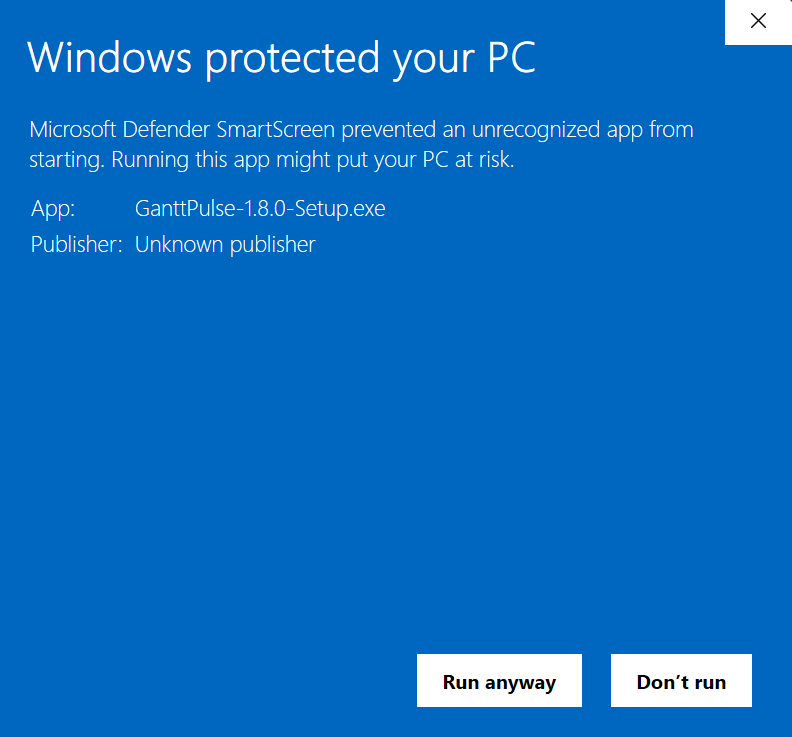
GanttPulse is new, its installer isn't code-signed, and few people have downloaded it yet, so your browser and Windows don't know the publisher. That is what the warnings are about. Continue only with a file you downloaded from ganttpulse.com.
-
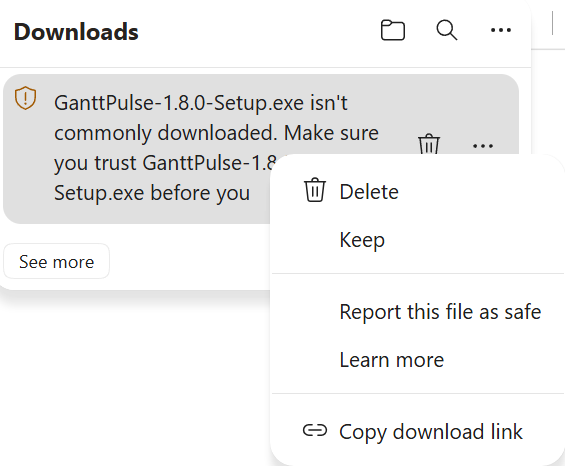
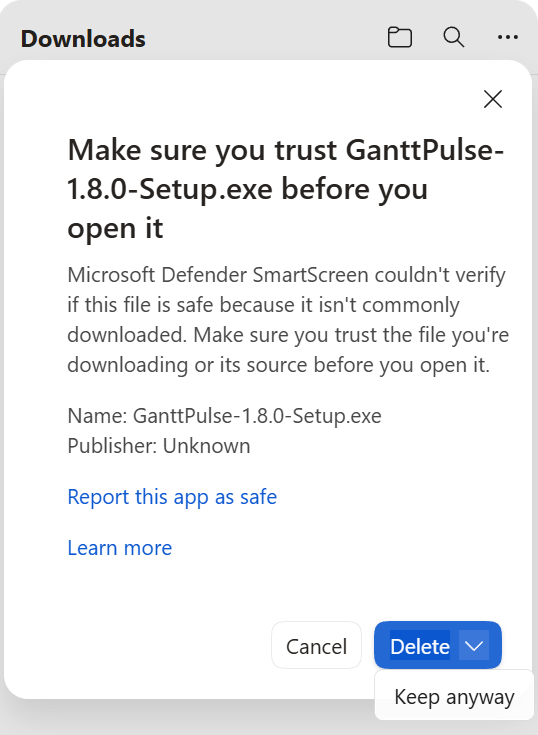
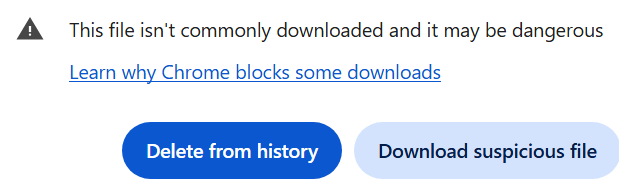
1. Your browser may warn that the file is not commonly downloaded. In Edge, point at the download, click its …, then Keep; in the next window, click the arrow next to Delete, then Keep anyway. In Chrome, click the arrow next to Suspicious download blocked, then Download suspicious file.
-
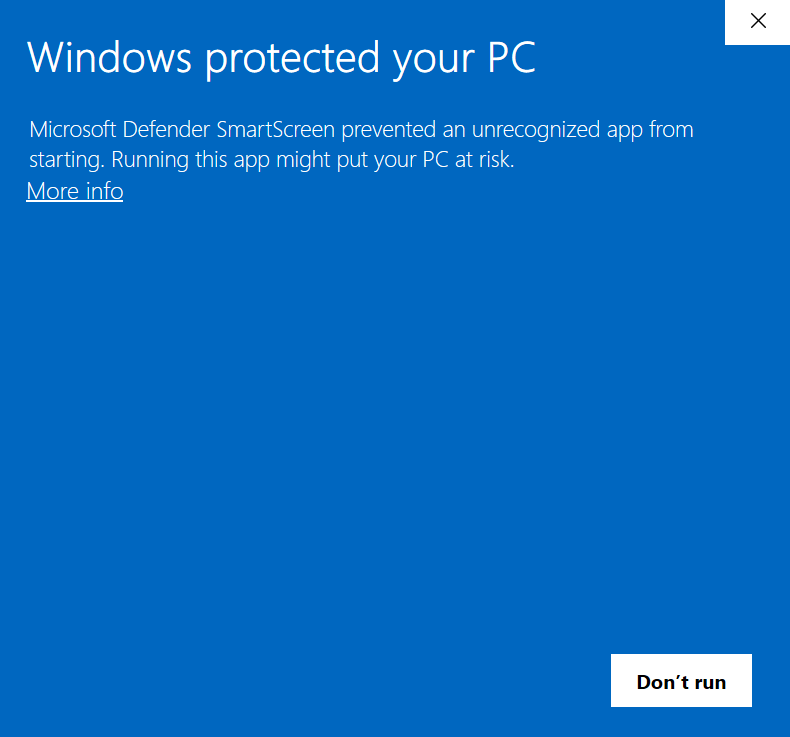
2. Windows shows "Windows protected your PC". Click More info.
-
3. The publisher reads Unknown publisher. Click Run anyway.
-
Check the file before you run it. In PowerShell:
Get-FileHash "$env:USERPROFILE\Downloads\GanttPulse-1.8.1-Setup.exe"The result must match the SHA-256 shown above, character for character. - Every build re-checks its full self-integrity manifest at boot, a tampered install refuses to run.
- With Smart App Control on, Windows blocks the installer, and it offers no way to allow a single app. See the FAQ.
What happens next
- 1
The first start can take up to two minutes with nothing on screen. The window opens by itself.
- 2
On a new file, Sign in makes your account: type a name and a password, and you become the manager.
- 3
Set your work week first: Settings › Calendar › Working Days. New files count Sunday to Thursday.
Ask for a beta key
The full app (Pro), free for 3 months from the day your key is sent. One key per person, with your email inside; it works on any PC. Beta users pay $49 instead of $79 when checkout opens.
Your key comes by email from support@ganttpulse.com. We keep your address on our own infrastructure and never share it.
Using Claude Code?
Install GanttPulse for Claude Code from the VS Code Marketplace, and every plan Claude approves becomes a live Gantt in GanttPulse. It needs GanttPulse 1.8.0 or later and the Claude Code extension.
A team server, on request
For a team that wants live collaboration on its own network: one server you host, with multiple people, live updates, roles and permissions, and your data never leaving your network. Everyone connects from their browser, so nothing is installed on their PCs.
Ask at support@ganttpulse.com.
Curious how "your projects stay on your machine" actually holds up? Read the security model.
More on why desktop: Gantt chart software for Windows · offline Gantt chart software