See Claude's plan come alive
GanttPulse turns every plan Claude Code makes into a real Gantt chart: phases, steps, links and milestones that fill in live as Claude works, right next to your code.
Free beta opens at the end of November · Needs GanttPulse 1.8.0 · Your projects stay in a file on your PC
An example drawn like the app: the same one the extension shows inside VS Code.
Why GanttPulse
See what Claude is doing, at a glance
In VS Code
Right next to your code
GanttPulse has its own view in the side bar: the tasks, every chat on your PC and an estimate of what the work has cost. Click GanttPulse in the status bar and your live Gantt opens in a VS Code tab; rest the pointer on it for a quick look at three numbers: tasks, chats and cost.
Live marks on the work
Six marks show what each chat is doing this minute: working, waiting for you, waiting on another chat, blocked, not answered or stopped. When a chat needs you, VS Code tells you, with a Go button.
- A ring in the chat's colour: A chat is working on this task now
- Yellow: A chat is waiting for your answer
- Indigo, an hourglass: Waiting on another chat, a build or a person
- Red: Blocked, with the reason
- Orange, a question mark: A chat asked you something and ended before your answer
- Gray, two bars: A chat stopped before the task was finished
It keeps the Gantt true by itself
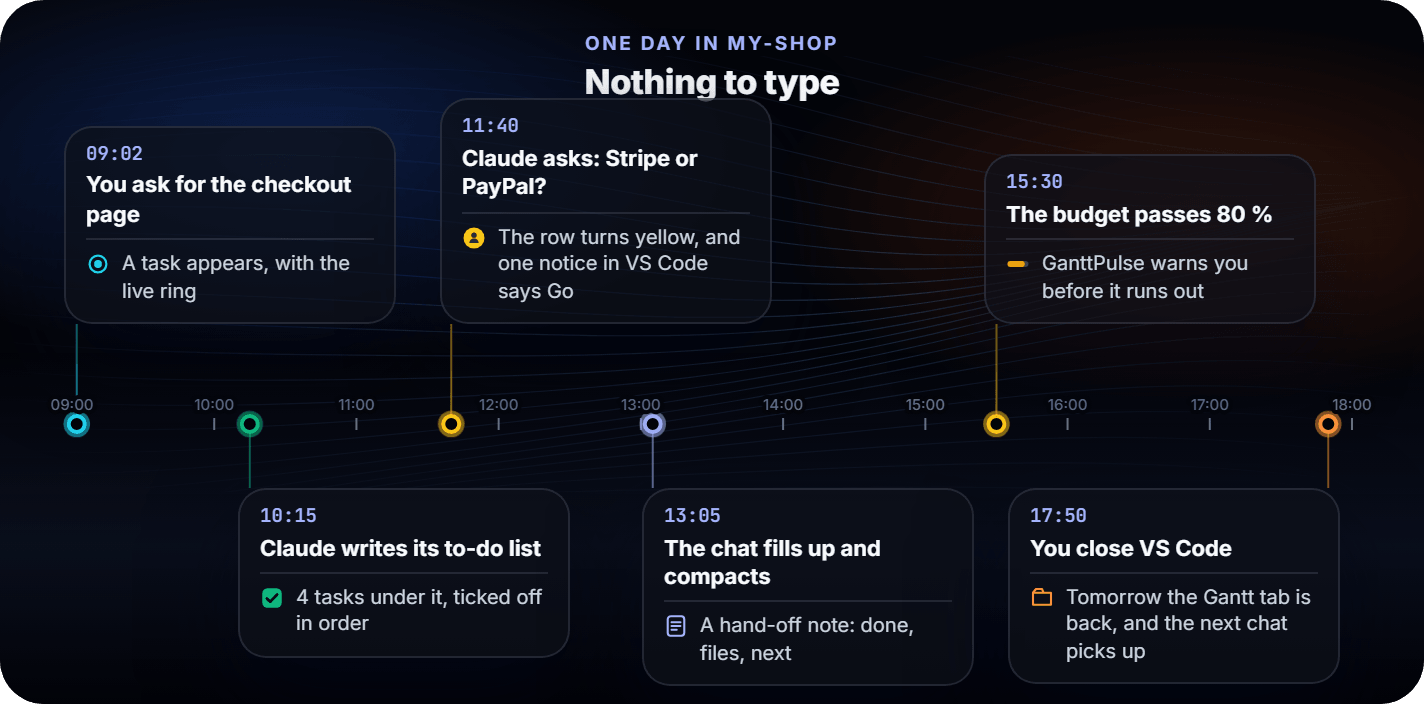
To-dos become tasks, a question turns the row yellow, a full chat leaves a hand-off note, and the next chat picks up.
In the GanttPulse app · Pro
See where the tokens go
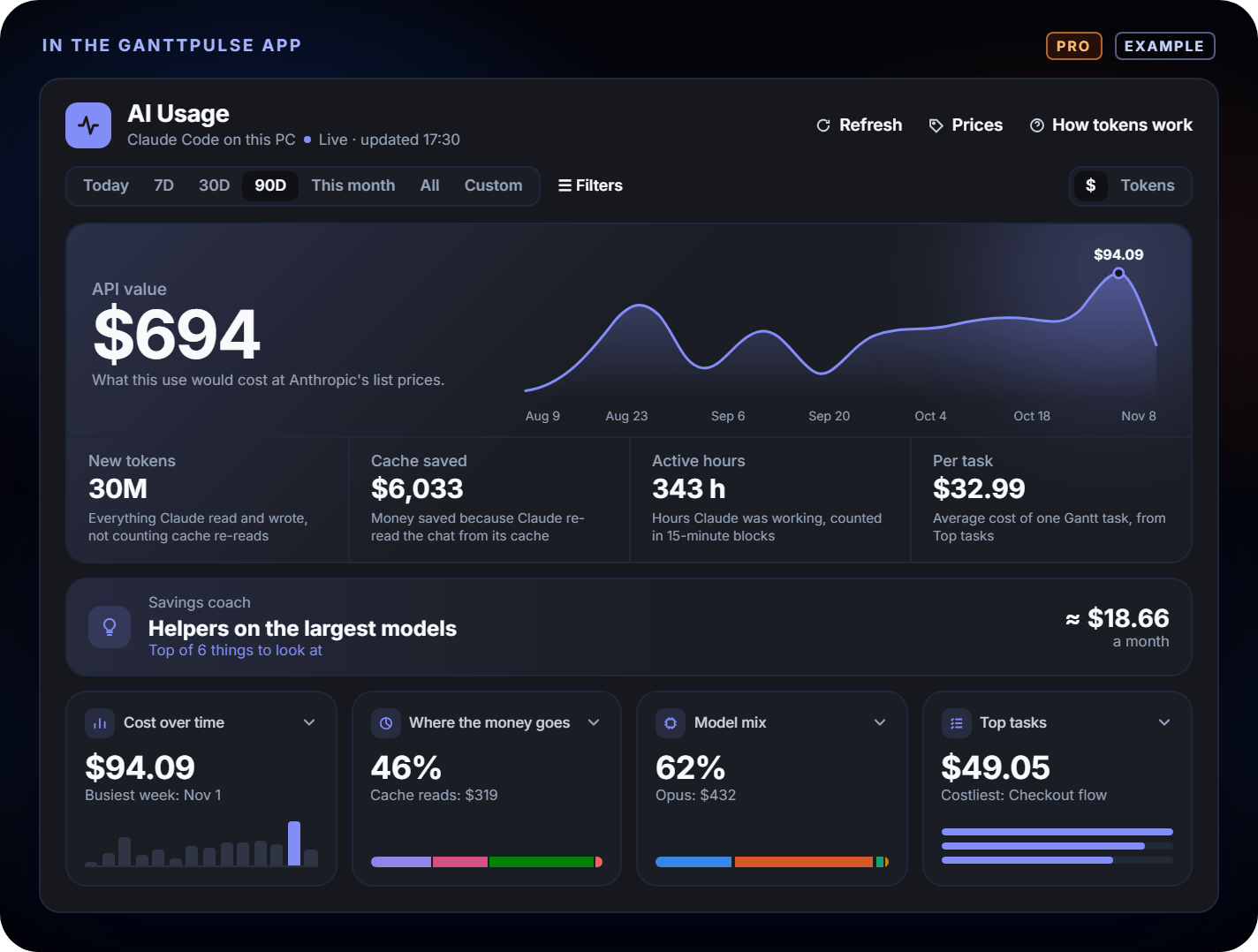
With GanttPulse Pro, the AI Usage page shows what Claude's work cost by day, model, chat and task, and a savings coach points at what to change. It reads your own numbers, on your PC, and costs no tokens.
16 commands in the chat
Type /ganttpulse to ask where
things stand, or to start, finish, pause or add a task by its # number. Add
help after any command to see how to use it.
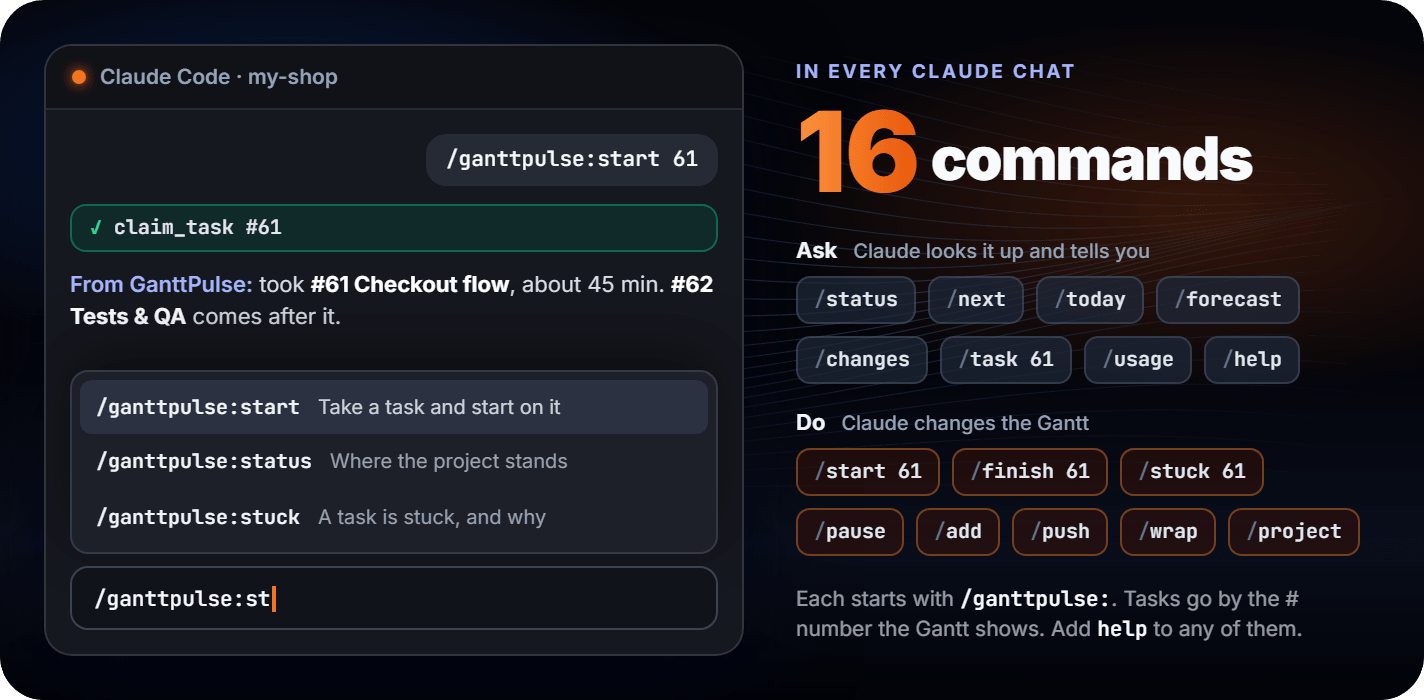
Or just ask in your own words:
| Say | You get |
|---|---|
| “Where are we?” | Done, in progress, next, blocked, late, and the work so far |
| “What's next?” | The steps that can start now, best first |
| “Will we make the deadline?” | On track, at risk or critical, and why (a Pro report) |
| “What changed this week?” | What moved, finished, slipped or was added (a Pro report) |
| “How much time went into it?” | Claude's hours, tokens and an estimate of the cost, by step, day or session |
Claude also works with the chart by itself: it pushes an approved plan, claims a step before working on it, reports progress and completes it. “Continue” makes it take the next step.
Set up
Set up in three steps
Nothing is typed into a terminal.
- 1
Install GanttPulse
Join the free beta, then install GanttPulse 1.8.0 and start it.
- 2
Install the extension
Get GanttPulse for Claude Code from the VS Code Marketplace. It installs the GanttPulse plugin into Claude Code and keeps it updated.
- 3
Connect, then plan
In GanttPulse, sign in to Claude's file (claude.db) from the Project list, then Settings › Claude Code › Connect Claude Code. Ask Claude to plan your next feature. The Gantt shows up by itself.
GanttPulse for Claude Code on the VS Code Marketplace · GanttPulse editions and requirements
Free and Pro
Free to use. Pro is optional
The free version does the real work, during the beta and after it. Pro adds the tools for advanced work.
Everything you need to work with Claude
In Claude's projects
- Every plan Claude makes, on a live Gantt, with no limit on projects, tasks and links
- Six live marks, and a filter by mark
- Day, Week, Month and Hours views, and subtasks at any depth
In VS Code
- The side view, the status box and the /ganttpulse chat commands
- To-dos become tasks, chats hand off, and each task gets its hours and tokens
- An estimate of the cost by model, and a budget that warns
Your projects stay in a file on your PC. To change Claude's project, ask Claude. No licence key needed.
For advanced work
Work by hand
- Edit Claude's projects yourself; all link types, lags and auto-scheduling
- The AI Task Assistant, on your own API key
See and report
- Dashboard, My Tasks and Magic Overview; Workload, Swimlanes and the 3D Timeline
- Advanced filters and saved presets
- The deadline forecast, the what-changed report and the AI Usage page
Export and import
- PDF, Excel, PowerPoint, MS Project, MS Planner and CSV; portfolio and baseline reports
- No limits on your own projects, tasks and seats
One licence, bought once, never a subscription. See pricing →
Own your projects
- GanttPulse runs on your PC and keeps your projects in a file on your machine. Nothing is ever sent to GanttPulse.
- Claude Code works as usual: what Claude reads from the chart goes to its AI provider, like anything else Claude reads.
- The connector never calls a model and needs no AI key inside GanttPulse. One click in the app makes the key it uses.
The whole list of what leaves your machine is on the security page.
Limits, stated plainly
- Windows 10 or 11, the Claude Code extension for VS Code, Node.js 18 or later, and the GanttPulse desktop app, version 1.8.0 or later.
- The extension updates itself through VS Code, and updates the GanttPulse plugin inside Claude Code with it.
- GanttPulse plans in days and Claude's steps take minutes: press 4 in the app for the Hours view, which draws each step at the times it really ran.
- Claude Code only, for now. Other MCP clients are not a supported path yet.
- Free, during the beta and after it: Claude Code works on the free version of GanttPulse, and the projects it makes have no limits. Pro adds the advanced tools: editing Claude's projects by hand, Magic Overview, the dashboard, workload, advanced filters, exports, the deadline forecast, the what-changed report and the AI Usage page.
Claude Code and GanttPulse, asked directly
Does it need an API key?
No. The Connect button in GanttPulse makes a key for GanttPulse's own API, and that is all the connector uses. It never calls a model. Claude Code runs on the account it already has.
Does Claude see my project data?
Claude reads what the tools return: task names, dates, status and notes. That goes to Claude's AI provider like anything else Claude reads in a session. Nothing goes to GanttPulse.
Can two Claude chats work on one plan?
Yes. Each chat is its own worker on the Gantt, named after the chat (a /rename renames it) or, without a name, Claude · A, Claude · B. A task one chat holds is refused to the other, with who has it and since when, so two chats never work the same task.
Does it work with Cursor, Codex or Claude Desktop?
Not today. The plugin ships inside the VS Code extension and needs Claude Code. If that changes, this page will say so.
What does it cost?
Nothing. Claude Code works on the free version of GanttPulse, during the beta and after it, and the projects it makes have no limits on tasks or projects. Pro, the one-time license, adds the advanced tools: editing Claude's projects by hand, Magic Overview, the dashboard, workload, advanced filters, exports, the deadline forecast, the what-changed report and the AI Usage page. Watch it free, edit it with Pro.
Is it open source?
The extension is MIT-licensed and anyone can unpack it and read the code. Its source repository is private for now.
More about the app: every feature · pricing · the product tour
See your next feature on a Gantt
Works on the free version of GanttPulse. Beta users lock in Pro at $49.
One email when the beta opens. Kept on our own infrastructure, used once, never shared.
Already have GanttPulse? Get the extension and click Connect Claude Code in the app.